Key takeaways
- Business Hub lets you claim your business in ChatGPT, manage its details, and see aggregate insights. You’ll find it in the ChatGPT sidebar.
- You can claim a business if you own it or are authorised to represent it. You don’t need an Ads account or a ChatGPT Enterprise agreement.
- Claiming is step one. Persona identity verification is what unlocks publishing changes, product feeds, insights, and the blue verified badge.
- Business Agents are a separate, optional thing — currently limited to eligible ecommerce and online service businesses in the US.
- The part most guides get wrong: claiming does not make ChatGPT recommend you more often. OpenAI states this directly. Claiming gives you control over your information, not over ChatGPT’s answers.
On 10 November 2026, OpenAI quietly did something that changes how businesses show up in AI answers. They launched Businesses in ChatGPT — a way to claim your company, manage what ChatGPT knows about it, and see how often people run into you.
If you’ve ever claimed a Google Business Profile, the shape of this will feel familiar. Search for your business, prove you’re really you, fix the details.
But there’s one important difference, and I want to put it near the top rather than bury it: claiming your business doesn’t make ChatGPT recommend you more. OpenAI says so in their own help docs. A lot of posts about this feature are going to imply otherwise. They’re wrong, and acting on that wrong idea will cost you a quarter.
So let’s go through what this actually is, who can set it up, how to do it, and what it does and doesn’t get you.
What is Business Hub in ChatGPT?
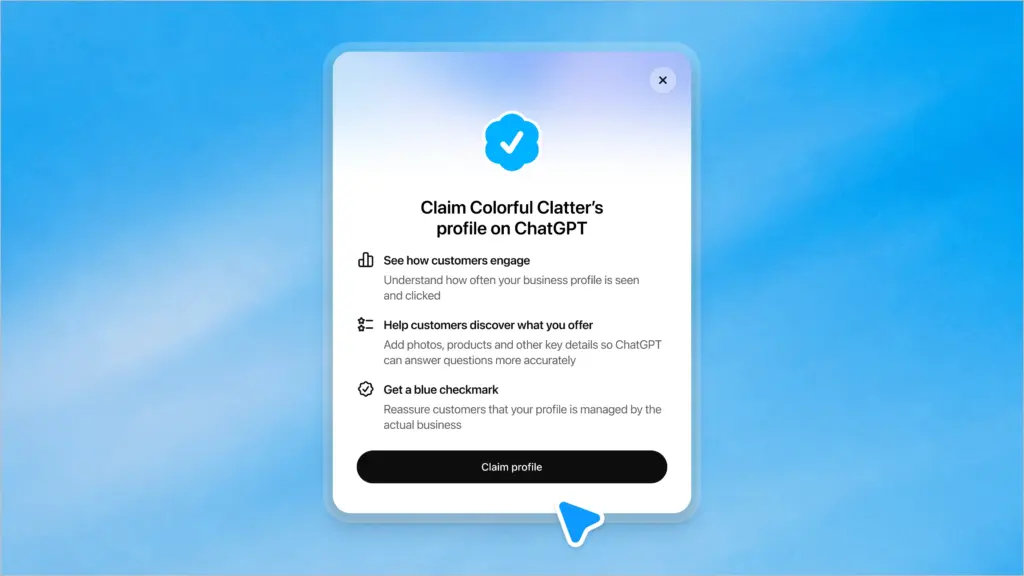
Business Hub is the place where you claim your business in ChatGPT, provide your business details and product information, and see how people engage with you. You access it from the sidebar inside ChatGPT.
Three things live under it:
Your business profile. Website, description, category, logo, delivery and return policies, cover photo. This is the information you’re telling ChatGPT is correct.
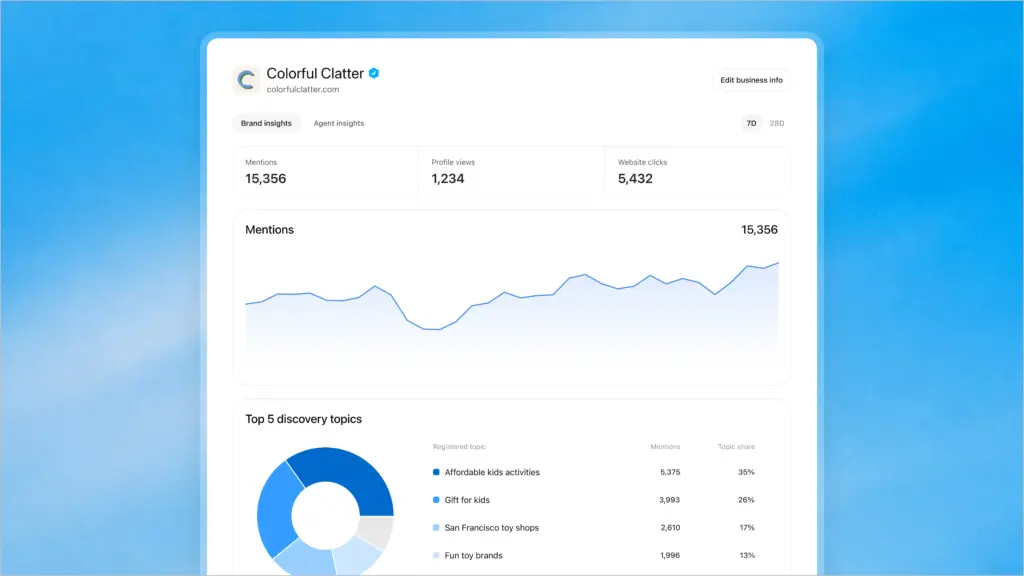
Insights. Aggregate data on mentions, website clicks, and discovery topics over a rolling 28 days.
Business Agents. An optional AI agent that answers customer questions about your products and policies. Separate eligibility, separate setup, and only in the US right now.
Worth knowing the scale you’re dealing with: OpenAI puts ChatGPT at 1.2 billion weekly users. That’s the room.
Can I use ChatGPT for my business?
Yes, and there are now three distinct ways — people mix these up constantly, so it’s worth separating them:
| What | What it does | Who it’s for |
|---|---|---|
| ChatGPT as a tool | Your team uses ChatGPT to write, code, analyse | Anyone |
| Business Hub profile | You claim your business so ChatGPT has correct info about you, and you can see engagement | Any eligible business |
| Business Agent | Customers chat directly with an AI agent representing your business | Eligible US ecommerce and online service businesses |
This guide is about the second and third. If someone asks “can I use ChatGPT for my business,” they usually mean the first — but the one that affects whether customers find you is the second.
Who can create a ChatGPT business profile?
You can claim a business if you own it or are authorised to represent it. You’ll need to verify that connection and get approved.
A few specifics that save time:
- No Ads account needed. No ChatGPT Enterprise agreement needed either.
- Location matters. You can claim where ChatGPT is available and the required verification is supported. Availability depends on your business’s location and type.
- Local stores and restaurants can currently only claim an existing US listing — you can’t add a new one from scratch.
- Online businesses that aren’t listed yet may see an option to add themselves.
- Enterprise customers and advertisers can go through their OpenAI representative instead.
- Shopify merchants get a streamlined path — connect from Business Hub or the Shopify admin.
One structural limit worth planning around: each brand is managed separately. There’s no central management across a parent company’s brands and locations yet. Claiming the main brand doesn’t claim its locations.
Who should actually bother?
Not everyone needs this on day one. Here’s my honest read:
Do it now if:
- You sell online and people compare products before buying
- Your category gets asked about conversationally (“best X for Y”)
- Wrong information about you is circulating — pricing, policies, what you even do
- You’re in a competitive space where a rival claiming first means their details are clean and yours aren’t
Do it soon, no rush:
- B2B services with long sales cycles — useful, but the insights matter more than the listing
- Local businesses outside the US, where you’re waiting on availability anyway
Think twice before publishing if:
- You’re not ready to keep the information current. Stale details are worse than none.
- You can’t commit to the agent. An agent that answers badly is a liability, not an asset.
That last point deserves a warning of its own.
⚠️ Read this before you publish
Two things in OpenAI’s documentation that are easy to miss and hard to undo:
Publishing is close to a one-way door. Only unpublished draft profiles can be deleted. OpenAI Support states it cannot delete, unpublish, or hide a published profile as part of a business setup or ownership request.
You can publish by accident. If you use Persona to create a new profile, OpenAI’s approval automatically publishes it. There’s no separate publish step for the profile. So the moment you submit, you’ve effectively decided.
Get your business description, category, logo and policies right before you verify. Not after.
How do I add my business to ChatGPT? (Step by step)
Step 1 — Find and claim your business
Direct link: chatgpt.com/business-hub — or open Business Hub from the ChatGPT sidebar.
- Sign in to ChatGPT and open Business Hub
- Search for your business by name
- Select the listing that matches, and confirm which ChatGPT account will manage it
- Choose a verification method
If you got a claim invitation by email, open that personal link and sign in with the address that received it. Don’t forward it to a colleague — it’s tied to that account.
If you see Contact support, your listing is locked and you’ll need to request access.
Step 2 — Verify your claim
Four methods, depending on what’s offered for your business:
| Method | How it works | Best when |
|---|---|---|
| Business phone | SMS or automated call with a code | Fastest, if the number on file is current |
| Business email | Code to the email associated with the business | Simple, if you control that inbox |
| Website domain | Add a TXT record to your DNS | Most reliable for online businesses |
| Shopify store | Connect and log in to Shopify | Obvious choice if you’re on Shopify |
On the DNS method: copy the type, name/host and value exactly. If someone else manages your domain, send it to them. DNS changes take time to propagate, so don’t panic if verification fails on the first attempt — wait, then hit Verify domain again.
Step 3 — Wait for claim approval
OpenAI reviews and emails you a decision or a request for more information. You can cancel while it’s pending.
Step 4 — Complete Persona identity verification
This is the step that actually matters, and it’s separate from claiming.
Until Persona verification is approved, you cannot:
- Publish changes to your business information
- Connect a product feed
- View insights
- Create a business agent
You may need a government-issued ID, business registration information, and proof that you’re authorised to represent the business. Make sure the business name, address and any registration or tax number match your official records exactly — mismatches are the most common reason these fail.
The blue verified badge comes from Persona approval, not from claiming. Claiming alone gets you nothing visible.
If you verified another way first, you can come back: open the Business tab → your profile → Complete verification with Persona.
Step 5 — Update your business information
Once approved, you can update your website, description, product or service category, logo, delivery policy, return policy, cover photo, and other optional details.
OpenAI reviews and publishes changes, and updates take time to appear. A saved change doesn’t mean every answer reflects it immediately — ChatGPT may also pull from other sources when answering questions about you.
Step 6 — Connect a product feed (if you sell products)
You can connect a feed — including a Shopify feed — to share prices and availability. A CSV feed must follow OpenAI’s product feed specification including its required fields, or you can link to a hosted feed URL. Products must follow the Commerce policies.
Note the caveat OpenAI includes: connecting a feed doesn’t publish an agent or guarantee that ChatGPT recommends your products.
Step 7 — Set up a Business Agent (optional, US only)
If you’re eligible:
- Open your business in the Business tab. If Shopify setup created a draft agent, open it. Otherwise create one if the option is there.
- Review the information the agent will use — product details, return policy
- Write instructions following the Business Agents Policy
- Preview it with a real customer question. OpenAI suggests something like “Can I return an item I bought on sale?” If the answer’s wrong, fix the information and test again.
- Publish when ready
Customers can only chat with a published agent.
What your agent can’t do: complete purchases, make bookings, or check a customer’s order. It explains products and policies and links to your site, where the customer does the rest.
And one that surprises people — business verification alone does not guarantee agent eligibility. OpenAI considers both your business category and the agent’s intended use, and may defer a category until they can support it safely.
Which OpenAI policies apply to you
There are three, and which ones bind you depends on how far you go. Worth knowing before you write a single line of business description.
| Policy | Applies when | What it governs |
|---|---|---|
| Businesses in ChatGPT | You claim a profile and add any information | Your business details, description, logo, policies |
| Commerce policies | You connect a product feed | The products themselves |
| Business Agents Policy | You create, publish or edit an agent | Instructions, information, links, forms, tools |
Additional advertising policies apply on top if you promote an agent through an ad. And OpenAI’s general Usage Policies sit underneath all of it.
So a business that just claims a profile is only dealing with the first. Add a feed, you pick up the second. Build an agent, all three.
What the Business Agents Policy actually requires
If you’re building an agent, these are the rules that get agents suspended. Short version:
- Be clearly AI. Your agent can’t appear to be a human, an independent adviser, or endorsed by OpenAI.
- Don’t invent things. No made-up offerings, prices, availability, credentials, reviews, guarantees or results. Don’t hide material fees or conditions.
- Don’t pressure people. No false urgency, no exploiting vulnerability, no continuing to push after someone declines.
- Don’t over-collect. No asking for health details, protected traits, government IDs, or financial/authentication credentials. Don’t submit forms, bookings or purchases on someone’s behalf without explicit authorisation through an approved feature.
- Stay in your lane. No advice requiring a professional licence, no automating high-stakes decisions without human review, no claiming credentials you don’t have.
OpenAI can limit features, pause or remove an agent, or restrict your ability to create agents at all — particularly for repeated issues.
What the insights actually tell you (and what they don’t)
Insights cover a rolling 28 days and show three things:
Mentions. Here’s the detail that matters most, and almost nobody will report it correctly: for an online business, a mention only counts when ChatGPT references your website. The brand name alone doesn’t count. For a local business, a mention counts when ChatGPT shows a result for that location, even if nobody clicks.
Sit with that for a second. If ChatGPT names your brand in a hundred answers but never cites your site, your dashboard shows zero mentions.
Website clicks. How often people click through.
Discovery topics. Common themes in answers that mentioned or cited you. Aggregate categories only.
What you will never get: individual prompts, customer conversations, or chats with your own business agent. OpenAI doesn’t share those.
And a blank metric doesn’t mean zero. It can mean activity hasn’t hit the reporting threshold, data’s still being collected, or reporting is unavailable.
Because mentions only count website citations, Business Hub insights will systematically undercount your real brand presence in ChatGPT. They’re a useful signal, not a complete picture. If you want to know how often you’re actually named — cited or not — you need to measure it separately. We cover how in how to track AEO and GEO and measure AI share of voice.
The thing nobody will tell you: claiming ≠ ranking
OpenAI’s own FAQ answers this plainly. Claiming lets you manage the information you provide. It doesn’t guarantee increased visibility or give you control over ChatGPT’s independent recommendations. They add that advertising doesn’t influence ChatGPT’s independent answers either.
This is the opposite of how Google Business Profile trained everyone to think. There, claiming and optimising genuinely moved you in local results. Here, it doesn’t.
So what does decide whether ChatGPT recommends you?
The same thing as before this feature existed: whether you’re the kind of source ChatGPT draws on when it builds an answer. That comes from being referenced across the web, from third-party sources carrying your name, from content structured so it can be lifted and cited, and from a clear, consistent entity.
Think of it this way. Business Hub is you filling in the form. Citations are other people vouching for you. Models weight the vouching.
Which means the practical sequence is:
- Claim and verify — so your information is right and you can measure
- Work on citations and coverage — so you’re in the answer at all
- Watch insights — to see whether step two is working
Skipping to step one and stopping there is the mistake I expect most businesses to make over the next six months.
If you want the mechanics of step two: AI citations for AEO visibility covers how citations are actually earned, and why AI finds your content but doesn’t cite it covers the most common reasons brands stay invisible despite publishing plenty. New to the terminology? Start with what answer engine optimisation is.
How do I integrate AI into my business beyond this?
Claiming your profile is a visibility move, not an AI strategy. If you’re thinking about the bigger picture, there are three separate tracks and they’re worth keeping separate:
Being found by AI — AEO and GEO work, which is what this guide sits inside. Serving customers with AI — the Business Agent, chat support, product discovery. Running the business with AI — internal tooling, automation, analysis.
Most companies jump to the third because it’s the most visible internally, and neglect the first because nobody owns it. That ordering is usually backwards for anything customer-facing.
How do I add my business to ChatGPT?
Sign in to ChatGPT, open Business Hub from the sidebar, and search for your business by name. Select the matching listing, choose a verification method (business phone, business email, website domain, or Shopify), and complete it. After OpenAI approves your claim, complete identity verification with Persona to unlock publishing, insights, and product feeds.
How do I register my brand on ChatGPT?
Through Business Hub. You can claim a business if you own it or are authorised to represent it. You’ll verify your connection to the business, then complete Persona identity verification — which may require a government-issued ID, business registration details, and proof you’re authorised to represent the company.
Is it free to claim my business in ChatGPT?
OpenAI doesn’t require an Ads account or a ChatGPT Enterprise agreement to claim an eligible business. Claiming, publishing an agent, and advertising are described as separate things.
Will claiming my business make ChatGPT recommend it more often?
No. OpenAI states that claiming lets you manage the information you provide, but doesn’t guarantee increased visibility or give you control over ChatGPT’s independent recommendations. Getting recommended still depends on being a source ChatGPT draws on when building answers.
Do I need Shopify to set up a business agent?
No. Eligible businesses can set up an agent with or without Shopify. If you do use Shopify, you can connect its product feed for prices and availability — but you still review and publish the agent separately.
Who is eligible for a ChatGPT Business Agent?
Business Agents are currently available to eligible ecommerce and online service businesses in the United States with a website, that meet the industry requirements in OpenAI’s Business Agents Policy. Verification alone doesn’t guarantee eligibility — OpenAI reviews both the business category and the agent’s intended use.
Can my ChatGPT business agent take orders or bookings?No. The agent can explain your products and policies and link to your website, where customers complete purchases, bookings, or order checks themselves.
Does my business agent connect to my existing ChatGPT plugin?
No. If your business also has a plugin in ChatGPT, the business agent’s separate chat doesn’t use data from that plugin or connect to its capabilities. They’re independent.
Can I sponsor or advertise my business agent?
Yes. OpenAI allows businesses to sponsor their Business Agent and use it as the destination for ChatGPT Ads. Sponsored placements are clearly labelled and kept separate from ChatGPT’s responses — and OpenAI states that advertising doesn’t influence its independent answers.
Can I delete my ChatGPT business profile?
Only unpublished draft profiles can be deleted. OpenAI Support states it cannot delete, unpublish, or hide a published profile as part of a business setup or ownership request. Get your details right before you publish.